

The Privacy Problem with Cloud Storage
When building a social media platform with multiple privacy levels (Public, Friends-Only, Private), we faced a critical decision: how do we serve media files while enforcing privacy at the infrastructure level, not just the application level?
Overview
The Friniemy social media platform implements a privacy-first media sharing architecture using a dual-bucket storage strategy with Cloudflare R2. The system ensures that:
- ✅ Public content is served via CDN with permanent URLs
- ✅ Private/Friends content requires signed URLs with automatic expiration
- ✅ Media is automatically routed to appropriate storage based on privacy settings
- ✅ Privacy changes trigger automatic media migration between buckets
- ✅ All media processing happens asynchronously in the background
Key Technologies:
- Storage: Cloudflare R2 (S3-compatible)
- Databases: PostgreSQL (relational data) + MongoDB (posts/media content)
- Queue: Bull (Redis-based job queue)
- Processing: Sharp (images), FFmpeg (video/audio)
- Backend: NestJS with Prisma ORM
The Naive Approach (Why It Fails)
The obvious solution might be:
- Store all files in one bucket with a custom CDN domain
- Check user permissions in the API before returning URLs
- Hope nobody guesses the URL patterns
The problem? Once you add a custom domain to a cloud storage bucket, that bucket becomes publicly accessible. Even with obfuscated filenames, this creates a security vulnerability:
https://cdn.example.com/posts/user123/private-photo.jpg
↓
Anyone with this URL can access it directly, bypassing your API!
Why Traditional Solutions Don't Scale
We evaluated several approaches before settling on our architecture:
Option 1: Proxy All Media Through the API
- ❌ High bandwidth costs on application servers
- ❌ Added latency (every request goes through Node.js)
- ❌ Doesn't leverage CDN caching effectively
- ❌ Creates application server bottleneck
Option 2: Single Bucket with Permission Checks
- ❌ URLs can be shared/leaked without context
- ❌ Browser caching exposes private content
- ❌ No infrastructure-level enforcement
- ❌ Vulnerable to timing attacks
Option 3: Dynamic URL Obfuscation
- ❌ Obfuscation ≠ Security
- ❌ URLs still permanent once discovered
- ❌ Doesn't prevent direct access
- ❌ Gives false sense of security
Architecture Flow
We implemented a dual-bucket architecture that enforces privacy at the infrastructure level, making it impossible to access private content without proper authorization.
High-Level Media Sharing Flow
┌─────────────────────────────────────────────────────────────────┐
│                    USER UPLOADS MEDIA                           │
└────────────────────────────┬────────────────────────────────────┘
                             │
                             ▼
┌─────────────────────────────────────────────────────────────────┐
│  STEP 1: TEMPORARY UPLOAD (Private Bucket)                      │
│  ────────────────────────────────────────────────────────────── │
│  • File uploaded to temp/{userId}/{mediaId}.{ext}               │
│  • MediaUpload record created in MongoDB                        │
│  • Temporary signed URL generated (1 hour expiry)               │
│  • Returns immediately to client                                │
│  • Queues "process-media" background job                        │
└────────────────────────────┬────────────────────────────────────┘
                             │
                             ▼
┌─────────────────────────────────────────────────────────────────┐
│  STEP 2: BACKGROUND PROCESSING                                  │
│  ────────────────────────────────────────────────────────────── │
│  For Images:                                                    │
│  • Generate blurhash (32x32 preview)                            │
│  • Create thumbnail (400x400)                                   │
│  • Extract dimensions (width, height)                           │
│                                                                 │
│  For Videos:                                                    │
│  • Extract metadata (duration, dimensions)                      │
│  • Generate thumbnail from 1-second mark                        │
│  • Optimize thumbnail with Sharp                                │
│                                                                 │
│  For Audio:                                                     │
│  • Compress to 128kbps MP3                                      │
│  • Extract duration                                             │
│  • Update file with compressed version                          │
│                                                                 │
│  • Status updated to "COMPLETED"                                │
└────────────────────────────┬────────────────────────────────────┘
                             │
                             ▼
┌─────────────────────────────────────────────────────────────────┐
│  STEP 3: USER CREATES POST                                      │
│  ────────────────────────────────────────────────────────────── │
│  POST /v1/posts                                                 │
│  {                                                              │
│    "content": "My awesome post!",                               │
│    "mediaIds": ["media-id-1", "media-id-2"],                    │
│    "privacy": "OPEN" | "FRIENDS" | "CLOSED"                     │
│  }                                                              │
│                                                                 │
│  • Validates ownership of all media IDs                         │
│  • Creates Post record in MongoDB                               │
│  • Queues "migrate-media" job for each media item              │
│  • Returns post immediately to client                           │
└────────────────────────────┬────────────────────────────────────┘
                             │
                             ▼
┌─────────────────────────────────────────────────────────────────┐
│  STEP 4: MEDIA FINALIZATION (Background)                        │
│  ────────────────────────────────────────────────────────────── │
│                                                                 │
│  IF privacy = "OPEN":                                           │
│  ┌──────────────────────────────────────────────────┐          │
│  │ • Move from private bucket to PUBLIC bucket      │          │
│  │ • New path: posts/{userId}/{timestamp}-{random}  │          │
│  │ • Public URL: https://cdn.friniemy.com/...       │          │
│  │ • Delete temp files from private bucket          │          │
│  └──────────────────────────────────────────────────┘          │
│                                                                 │
│  IF privacy = "FRIENDS" or "CLOSED":                            │
│  ┌──────────────────────────────────────────────────┐          │
│  │ • Keep in PRIVATE bucket                         │          │
│  │ • New path: posts/{userId}/{timestamp}-{random}  │          │
│  │ • Store key only (signed URLs generated on-demand)│         │
│  │ • Delete temp files                              │          │
│  └──────────────────────────────────────────────────┘          │
│                                                                 │
│  • Update Post.media[] with finalized URLs                      │
│  • Preserve metadata (blurhash, dimensions, etc.)               │
│  • Maintain media order                                         │
└────────────────────────────┬────────────────────────────────────┘
                             │
                             ▼
┌─────────────────────────────────────────────────────────────────┐
│  STEP 5: CLIENT DISPLAYS MEDIA                                  │
│  ────────────────────────────────────────────────────────────── │
│  GET /v1/posts/{postId}                                         │
│                                                                 │
│  For PUBLIC posts:                                              │
│  • Returns permanent CDN URL                                    │
│  • URL format: https://cdn.friniemy.com/posts/...               │
│  • No expiration, cached indefinitely                           │
│                                                                 │
│  For PRIVATE/FRIENDS posts:                                     │
│  • Generates signed URL on-the-fly                              │
│  • CLOSED: 5-minute expiration                                  │
│  • FRIENDS: 15-minute expiration                                │
│  • Client must refresh before expiration                        │
│                                                                 │
│  Returns:                                                       │
│  {                                                              │
│    "media": [                                                   │
│      {                                                          │
│        "id": "...",                                             │
│        "url": "...",                    // Storage key          │
│        "viewUrl": "https://...",        // Actual view URL      │
│        "urlExpiration": "2025-10-08...", // If signed          │
│        "thumbnailUrl": "...",                                   │
│        "thumbnailViewUrl": "https://...",                       │
│        "blurhash": "...",                                       │
│        "width": 1920,                                           │
│        "height": 1080                                           │
│      }                                                          │
│    ]                                                            │
│  }                                                              │
└─────────────────────────────────────────────────────────────────┘
Privacy Change Flow
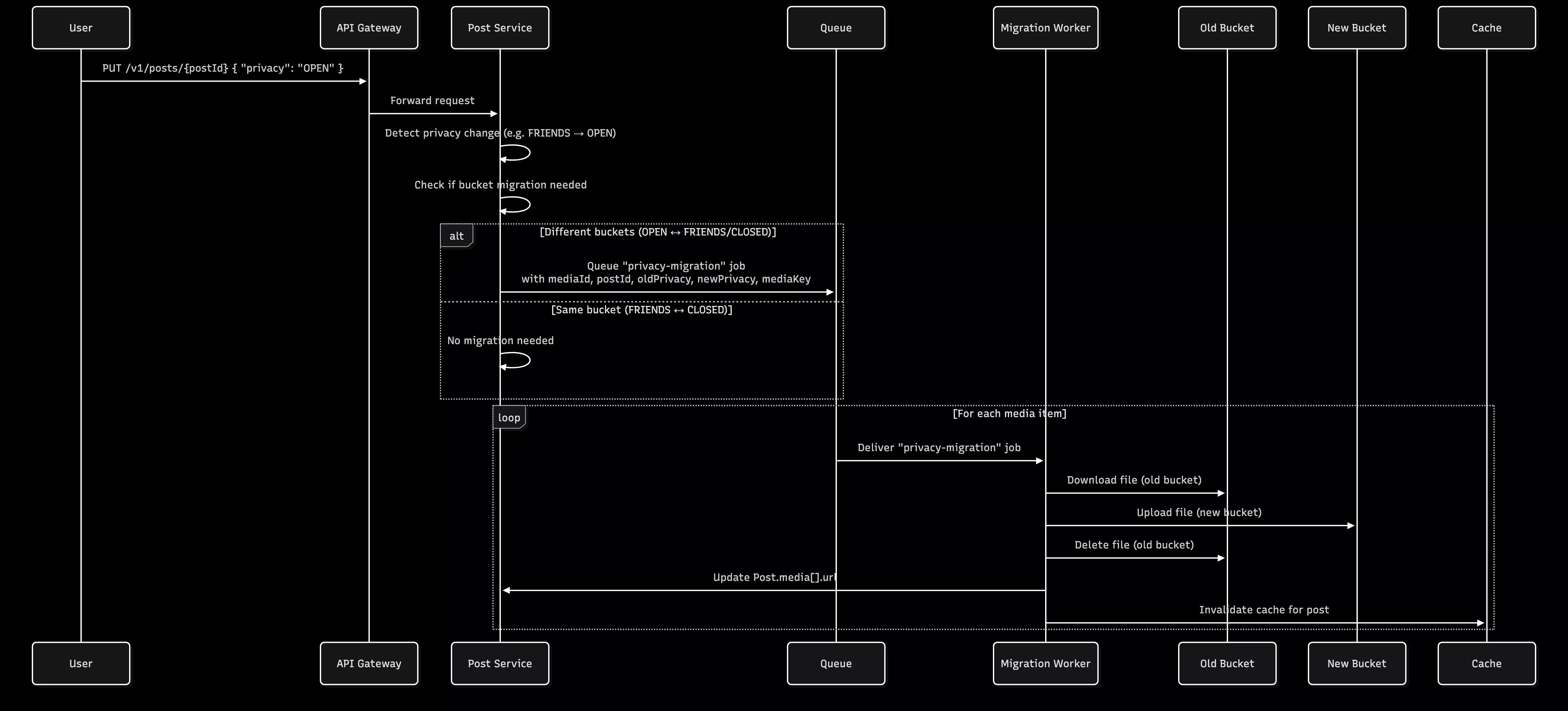
┌─────────────────────────────────────────────────────────────────┐
│  USER CHANGES POST PRIVACY                                      │
│  PUT /v1/posts/{postId}  { "privacy": "OPEN" }                  │
└────────────────────────────┬────────────────────────────────────┘
                             │
                             ▼
┌─────────────────────────────────────────────────────────────────┐
│  PRIVACY CHANGE DETECTION                                       │
│  ────────────────────────────────────────────────────────────── │
│  Old Privacy: "FRIENDS" → New Privacy: "OPEN"                   │
│                                                                 │
│  Check if bucket migration needed:                              │
│  • OPEN ↔ FRIENDS/CLOSED = YES (different buckets)              │
│  • FRIENDS ↔ CLOSED = NO (same bucket)                          │
└────────────────────────────┬────────────────────────────────────┘
                             │
                             ▼
┌─────────────────────────────────────────────────────────────────┐
│  QUEUE PRIVACY MIGRATION JOB                                    │
│  ────────────────────────────────────────────────────────────── │
│  For each media item in post:                                   │
│  • Queue "privacy-migration" job                                │
│  • Job parameters:                                              │
│    - mediaId                                                    │
│    - postId                                                     │
│    - oldPrivacy                                                 │
│    - newPrivacy                                                 │
│    - mediaKey (current storage path)                            │
└────────────────────────────┬────────────────────────────────────┘
                             │
                             ▼
┌─────────────────────────────────────────────────────────────────┐
│  BACKGROUND: MOVE FILES BETWEEN BUCKETS                         │
│  ────────────────────────────────────────────────────────────── │
│  1. Download file from OLD bucket (private)                     │
│  2. Upload file to NEW bucket (public)                          │
│  3. Delete file from OLD bucket                                 │
│  4. Update Post.media[].url with new URL                        │
│  5. Invalidate cache for this post                              │
└─────────────────────────────────────────────────────────────────┘
Privacy-First Storage Strategy
The Challenge
Problem: When you add a custom domain to an R2 bucket, that bucket becomes publicly accessible. This means anyone with a file URL can access it, bypassing privacy checks.
Example of Risk:
https://cdn.friniemy.com/posts/user123/private-photo.jpg
↓
ANYONE can access this URL directly!
The Solution: Dual Bucket Architecture
We use TWO separate R2 buckets to enforce privacy at the storage level:
Bucket 1: Public Bucket
- Name:
friniemy-media-public - Custom Domain:
https://cdn.friniemy.com - Purpose: Store OPEN/public post media
- Access: Direct CDN URLs, no authentication needed
- Bucket Policy: Public read access enabled
- Example URL:
https://cdn.friniemy.com/posts/user123/sunset.jpg
Bucket 2: Private Bucket
- Name:
friniemy-media-private - Custom Domain: ❌ NONE
- Purpose: Store FRIENDS/CLOSED post media
- Access: Signed URLs only, through API authentication
- Bucket Policy: All access blocked by default
- Example URL:
https://account-id.r2.cloudflarestorage.com/friniemy-media-private/posts/user123/photo.jpg?X-Amz-Signature=...&X-Amz-Expires=900
Storage Path Structure
PUBLIC BUCKET (friniemy-media-public)
├── posts/
│   ├── {userId}/
│   │   ├── {timestamp}-{random}.jpg
│   │   ├── {timestamp}-{random}-thumb.jpg
│   │   └── {timestamp}-{random}.mp4
│   └── ...
└── profiles/
    └── {userId}/
        └── avatar.jpg

PRIVATE BUCKET (friniemy-media-private)
├── temp/
│   └── {userId}/
│       ├── {mediaId}.jpg           (temporary uploads)
│       └── {mediaId}-thumb.jpg     (temporary thumbnails)
└── posts/
    └── {userId}/
        ├── {timestamp}-{random}.jpg
        ├── {timestamp}-{random}-thumb.jpg
        └── {timestamp}-{random}.mp4
Privacy Level → Storage Mapping
| Post Privacy | Bucket | Access Method | URL Type | Expiration |
|---|---|---|---|---|
| OPEN | Public | Direct CDN | https://cdn.friniemy.com/... | Never |
| FRIENDS | Private | Signed URL | https://...r2.cloudflarestorage.com/...?X-Amz-* | 15 minutes |
| CLOSED | Private | Signed URL | https://...r2.cloudflarestorage.com/...?X-Amz-* | 5 minutes |
TEMP (upload) | Private | Signed URL | https://...r2.cloudflarestorage.com/temp/... | 1 hour |
Media Upload & Processing Pipeline
1. Initial Upload (Immediate Response)
Endpoint: POST /v1/media/upload
// Client uploads file
const formData = new FormData();
formData.append('file', selectedFile);
formData.append('type', 'IMAGE'); // Optional

const response = await fetch('/v1/media/upload', {
  method: 'POST',
  headers: { Authorization: `Bearer ${token}` },
  body: formData
});

// Immediate response (< 1 second)
{
  "success": true,
  "data": {
    "id": "550e8400-e29b-41d4-a716-446655440000",
    "type": "IMAGE",
    "tempUrl": "https://...?X-Amz-Signature=...",
    "status": "PROCESSING",
    "uploadedAt": "2025-10-08T10:00:00Z",
    "expiresAt": "2025-10-09T10:00:00Z"  // 24 hours
  }
}
What Happens:
- File validated (size, type, format)
- Uploaded to
temp/{userId}/{mediaId}.{ext}in private bucket - MediaUpload record created in MongoDB with status
PROCESSING - Temporary signed URL generated (1 hour expiration)
- Background job queued:
process-media - Response returned to client immediately
2. Background Processing
Job: process-media
For Images:
async processImage(buffer: Buffer) {
  // 1. Extract metadata
  const metadata = await sharp(buffer).metadata();
  const { width, height } = metadata;

  // 2. Generate blurhash (for preview while loading)
  const resized = await sharp(buffer)
    .resize(32, 32, { fit: 'inside' })
    .raw()
    .toBuffer();
  const blurhash = encode(resized, 32, 32, 4, 4);

  // 3. Create thumbnail
  const thumbnail = await sharp(buffer)
    .resize(400, 400, { fit: 'inside', withoutEnlargement: true })
    .jpeg({ quality: 80 })
    .toBuffer();

  // 4. Upload thumbnail to temp storage
  const thumbnailKey = `temp/${userId}/${timestamp}-thumb.jpg`;
  await storageService.uploadFile(thumbnail, thumbnailKey, 'image/jpeg', 'CLOSED');

  return { width, height, blurhash, thumbnailUrl: thumbnailKey };
}
For Videos:
async processVideo(buffer: Buffer) {
  // 1. Extract metadata with FFprobe
  const metadata = await ffprobe(videoPath);
  const { width, height, duration } = metadata;

  // 2. Generate thumbnail at 1-second mark
  await ffmpeg(videoPath)
    .screenshots({
      timestamps: ['00:00:01.000'],
      size: '400x400'
    })
    .save(thumbnailPath);

  // 3. Optimize thumbnail
  const thumbnail = await sharp(thumbnailPath)
    .resize(400, 400, { fit: 'inside' })
    .jpeg({ quality: 80 })
    .toBuffer();

  // 4. Upload thumbnail
  const thumbnailKey = `temp/${userId}/${timestamp}-thumb.jpg`;
  await storageService.uploadFile(thumbnail, thumbnailKey, 'image/jpeg', 'CLOSED');

  return { width, height, duration, thumbnailUrl: thumbnailKey };
}
For Audio:
async processAudio(buffer: Buffer) {
  // 1. Compress to 128kbps MP3
  await ffmpeg(inputPath)
    .audioCodec('libmp3lame')
    .audioBitrate('128k')
    .audioChannels(2)
    .format('mp3')
    .save(outputPath);

  // 2. Extract metadata
  const metadata = await ffprobe(outputPath);
  const { duration } = metadata;

  // 3. Replace original with compressed version
  const processedKey = `temp/${userId}/${timestamp}.mp3`;
  await storageService.uploadFile(processedBuffer, processedKey, 'audio/mpeg', 'CLOSED');

  return { duration, size: processedBuffer.length };
}
3. Post Creation
Endpoint: POST /v1/posts
{
  "content": "Check out my photos!",
  "mediaIds": ["media-id-1", "media-id-2", "media-id-3"],
  "privacy": "OPEN",
  "hashtags": ["#photography", "#nature"]
}Validation:
- ✅ All media IDs belong to current user
- ✅ Maximum 10 media items
- ✅ Maximum 1 video per post
- ✅ Maximum 1 audio per post
- ✅ All media processing completed (or still in progress - optimistic approach)
Actions:
- Create Post record in MongoDB with media array
- Queue
migrate-mediajob for each media item - Update user's post count in PostgreSQL
- Update hashtag counts in MongoDB
- Return post to client immediately
4. Media Finalization (Background)
Job: migrate-media
async migrateMedia(job: {
  mediaId: string;
  userId: string;
  postId: string;
  privacy: 'OPEN' | 'FRIENDS' | 'CLOSED';
  order: number;
}) {
  // 1. Get media record
  const media = await getMediaUpload(mediaId);

  // 2. Generate permanent storage key
  const permanentKey = `posts/${userId}/${timestamp}-${random}.${ext}`;
  const permanentThumbKey = `posts/${userId}/${timestamp}-${random}-thumb.jpg`;

  // 3. Determine target bucket
  const targetBucket = privacy === 'OPEN' ? 'public' : 'private';

  // 4. Copy files to permanent location
  const fileBuffer = await getFile(media.url, 'private'); // temp is always private
  await uploadFile(fileBuffer, permanentKey, privacy);

  if (media.thumbnailUrl) {
    const thumbBuffer = await getFile(media.thumbnailUrl, 'private');
    await uploadFile(thumbBuffer, permanentThumbKey, privacy);
  }

  // 5. Delete temporary files
  await deleteFile(media.url, 'private');
  if (media.thumbnailUrl) {
    await deleteFile(media.thumbnailUrl, 'private');
  }

  // 6. Update Post.media[] with finalized data
  await updatePost(postId, {
    media: {
      id: mediaId,
      type: media.type,
      url: permanentKey,
      thumbnailUrl: permanentThumbKey,
      width: media.width,
      height: media.height,
      duration: media.duration,
      size: media.size,
      blurhash: media.blurhash,
      order: order
    }
  });

  // 7. Update MediaUpload record
  await updateMediaUpload(mediaId, {
    url: permanentKey,
    thumbnailUrl: permanentThumbKey,
    expiresAt: null  // No longer temporary
  });
}
Data Flow Between Databases
Upload → MongoDB.MediaUpload (temp state)
          ↓
Processing → Update MediaUpload with metadata
          ↓
Post Creation → MongoDB.Post (with media array)
                PostgreSQL.UserProfile (increment postsCount)
          ↓
Finalization → Update MongoDB.MediaUpload (permanent URL)
               Update MongoDB.Post.media[] (final URLs)
          ↓
User Reactions → PostgreSQL.Reaction (fast queries)
                 MongoDB.Post.reactionCounts (denormalized)
Privacy Management
Access Control Flow
async getPostById(postId: string, userId?: string) {
  // 1. Fetch post from MongoDB
  const post = await mongo.post.findUnique({ where: { id: postId } });

  // 2. Check privacy permissions
  if (post.privacy === 'OPEN') {
    // Anyone can view
  } else if (!userId) {
    throw new ForbiddenException('Authentication required');
  } else if (post.privacy === 'CLOSED') {
    // Only author can view
    if (post.authorId !== userId) {
      throw new ForbiddenException('This post is private');
    }
  } else if (post.privacy === 'FRIENDS') {
    // Check friendship in PostgreSQL
    const isFriend = await postgres.friendship.findFirst({
      where: {
        OR: [
          { user1Id: userId, user2Id: post.authorId },
          { user1Id: post.authorId, user2Id: userId }
        ]
      }
    });

    if (!isFriend && post.authorId !== userId) {
      throw new ForbiddenException('This post is only visible to friends');
    }
  }

  // 3. Generate appropriate URLs
  return await mapPostToDtoWithSignedUrls(post, userId);
}
URL Generation Based on Privacy
async mapPostToDtoWithSignedUrls(post: Post, userId?: string) {
  const privacy = post.privacy as 'OPEN' | 'FRIENDS' | 'CLOSED';

  // Generate view URLs for each media item
  const mediaWithUrls = await Promise.all(
    post.media.map(async (media) => {
      const urlResult = await storageService.getSignedUrlWithMetadata(
        media.url,
        privacy
      );

      let thumbnailUrl;
      if (media.thumbnailUrl) {
        const thumbResult = await storageService.getSignedUrlWithMetadata(
          media.thumbnailUrl,
          privacy
        );
        thumbnailUrl = thumbResult.url;
      }

      return {
        ...media,
        viewUrl: urlResult.url,           // Actual accessible URL
        urlExpiration: urlResult.expiresAt, // For private content
        thumbnailViewUrl: thumbnailUrl
      };
    })
  );

  return {
    ...post,
    media: mediaWithUrls
  };
}
async getSignedUrlWithMetadata(
key: string,
privacy: 'OPEN' | 'FRIENDS' | 'CLOSED'
): Promise<{ url: string; expiresAt?: string; expiresIn?: number }> {
// PUBLIC CONTENT - Direct CDN URL
if (privacy === 'OPEN') {
return {
url: `${this.publicUrl}/${key}`,
// No expiration
};
}
// PRIVATE CONTENT - Signed URL
const expiresIn = privacy === 'CLOSED'
? 5 * 60 // 5 minutes for private
: 15 * 60; // 15 minutes for friends
const signedUrl = await getSignedUrl(
this.s3Client,
new GetObjectCommand({
Bucket: this.privateBucketName,
Key: key
}),
{ expiresIn }
);
return {
url: signedUrl,
expiresAt: new Date(Date.now() + expiresIn * 1000).toISOString(),
expiresIn
};
}Privacy Change Handling
async updatePost(postId: string, userId: string, dto: UpdatePostDto) {
  const post = await getPost(postId);

  const oldPrivacy = post.privacy;
  const newPrivacy = dto.privacy;

  // Update post
  await updatePost(postId, dto);

  // Handle media migration if privacy changed
  if (newPrivacy && oldPrivacy !== newPrivacy) {
    await mediaService.handlePrivacyChange(
      postId,
      oldPrivacy,
      newPrivacy
    );
  }
}

async handlePrivacyChange(
  postId: string,
  oldPrivacy: 'OPEN' | 'FRIENDS' | 'CLOSED',
  newPrivacy: 'OPEN' | 'FRIENDS' | 'CLOSED'
) {
  const post = await getPost(postId);

  // Check if bucket migration needed
  const needsMigration =
    (oldPrivacy === 'OPEN' && ['FRIENDS', 'CLOSED'].includes(newPrivacy)) ||
    (['FRIENDS', 'CLOSED'].includes(oldPrivacy) && newPrivacy === 'OPEN');

  if (!needsMigration) return;

  // Queue migration for all media
  for (const media of post.media) {
    await mediaQueue.add('privacy-migration', {
      mediaId: media.id,
      postId,
      oldPrivacy,
      newPrivacy,
      mediaKey: media.url
    });
  }
}
URL Generation & Access Control
Public Content URLs
Characteristics:
- Permanent, never expire
- Served via Cloudflare CDN
- No authentication required
- Cached globally
Example:
https://cdn.friniemy.com/posts/user123/1696789012-a1b2c3.jpg
Implementation:
// For OPEN posts - simple concatenation
const publicUrl = `${this.publicUrl}/${key}`;
// Returns: https://cdn.friniemy.com/posts/user123/...
Private Content URLs
Characteristics:
- Temporary, auto-expire
- Require AWS Signature v4
- Validated by R2/S3
- Cannot be shared
Example:
https://abc123.r2.cloudflarestorage.com/friniemy-media-private/posts/user123/1696789012-a1b2c3.jpg?X-Amz-Algorithm=AWS4-HMAC-SHA256&X-Amz-Credential=...&X-Amz-Date=20251008T100000Z&X-Amz-Expires=900&X-Amz-Signature=...&X-Amz-SignedHeaders=host
Implementation:
import { getSignedUrl } from "@aws-sdk/s3-request-presigner";
import { GetObjectCommand } from "@aws-sdk/client-s3";

const command = new GetObjectCommand({
  Bucket: this.privateBucketName,
  Key: key,
});

const signedUrl = await getSignedUrl(this.s3Client, command, {
  expiresIn: 900, // 15 minutes
});
URL Expiration Strategy
| Privacy Level | Expiration | Why? | Client Action |
|---|---|---|---|
| OPEN | Never | Public content, served via CDN | Cache indefinitely |
| FRIENDS | 15 minutes | Balance between security and UX | Refresh before 13 minutes |
| CLOSED | 5 minutes | Maximum security for private content | Refresh before 3 minutes |
| TEMP (uploads) | 1 hour | Long enough to create post | Immediate use |
Client-Side URL Refresh
// Frontend: Check if URL needs refresh
function needsUrlRefresh(media: MediaItem): boolean {
  if (!media.urlExpiration) {
    return false; // Public URL, never expires
  }

  const expiresAt = new Date(media.urlExpiration).getTime();
  const now = Date.now();
  const timeLeft = expiresAt - now;

  // Refresh if less than 2 minutes remaining
  return timeLeft < 2 * 60 * 1000;
}

// Auto-refresh mechanism
setInterval(async () => {
  if (needsUrlRefresh(currentPost.media[0])) {
    // Re-fetch post to get fresh URLs
    const updatedPost = await fetchPost(currentPost.id);
    updateUIWithFreshUrls(updatedPost);
  }
}, 60 * 1000); // Check every minute
Background Processing Jobs
All asynchronous work is handled by Bull (Redis-based queue).
Job Queue Configuration
// Queue registration
BullModule.registerQueue({
  name: "media",
  redis: {
    host: process.env.REDIS_HOST,
    port: 6379,
  },
  defaultJobOptions: {
    attempts: 3,
    backoff: {
      type: "exponential",
      delay: 2000, // 2s, 4s, 8s
    },
    removeOnComplete: true,
    removeOnFail: false, // Keep for debugging
  },
});
Job 1: process-media
Purpose: Generate metadata for uploaded media
Triggered: Immediately after upload
Payload:
{
  mediaId: string;
  userId: string;
  tempKey: string;
  type: "IMAGE" | "VIDEO" | "AUDIO";
  mimeType: string;
}Tasks:
- Fetch file from temp storage
- Process based on type:
- Image: Generate blurhash + thumbnail + dimensions
- Video: Extract metadata + generate thumbnail
- Audio: Compress to 128kbps + extract duration
- Upload generated assets (thumbnails)
- Update MediaUpload status to
COMPLETED
Duration: 1-5 seconds per file
Retry: 3 attempts with exponential backoff
Job 2: migrate-media
Purpose: Move media from temp to permanent storage
Triggered: After post creation
Payload:
{
  mediaId: string;
  userId: string;
  postId: string;
  privacy: "OPEN" | "FRIENDS" | "CLOSED";
  order: number;
}Tasks:
- Fetch MediaUpload record
- Generate permanent storage keys
- Determine target bucket based on privacy
- Copy files to permanent location
- Delete temporary files
- Update Post.media[] with final URLs
- Update MediaUpload record (clear expiration)
Duration: 0.5-2 seconds per file
Retry: 3 attempts with exponential backoff
Job 3: privacy-migration
Purpose: Move media between buckets when privacy changes
Triggered: When post privacy is updated
Payload:
{
  mediaId: string;
  postId: string;
  oldPrivacy: "OPEN" | "FRIENDS" | "CLOSED";
  newPrivacy: "OPEN" | "FRIENDS" | "CLOSED";
  mediaKey: string;
}Tasks:
- Check if bucket migration needed (OPEN ↔ FRIENDS/CLOSED)
- Download from old bucket
- Upload to new bucket
- Delete from old bucket
- Update Post.media[].url
- Invalidate cache
Duration: 1-3 seconds per file
Retry: 3 attempts with exponential backoff
Monitoring Jobs
# Redis CLI - Check queue status
redis-cli
> LLEN bull:media:wait          # Pending jobs
> LLEN bull:media:active        # Currently processing
> LLEN bull:media:completed     # Completed jobs
> LLEN bull:media:failed        # Failed jobs

# Get failed job details
> LRANGE bull:media:failed 0 10
API Endpoints
Upload Media
POST /v1/media/upload
Content-Type: multipart/form-data
Authorization: Bearer <token>

{
  "file": <binary>,
  "type": "IMAGE" | "VIDEO" | "AUDIO"  (optional)
}

Response 201:
{
  "success": true,
  "data": {
    "id": "550e8400-e29b-41d4-a716-446655440000",
    "type": "IMAGE",
    "tempUrl": "https://...?X-Amz-Signature=...",
    "status": "PROCESSING",
    "uploadedAt": "2025-10-08T10:00:00Z",
    "expiresAt": "2025-10-09T10:00:00Z"
  }
}
Check Media Status
GET /v1/media/status?ids=id1,id2,id3
Authorization: Bearer <token>

Response 200:
{
  "success": true,
  "data": {
    "media": [
      {
        "id": "550e8400-...",
        "processingStatus": "COMPLETED",
        "storageStatus": "TEMPORARY",
        "url": "https://..."
      }
    ]
  }
}
Create Post
POST /v1/posts
Content-Type: application/json
Authorization: Bearer <token>

{
  "content": "My awesome post!",
  "mediaIds": ["id1", "id2"],
  "privacy": "OPEN" | "FRIENDS" | "CLOSED",
  "hashtags": ["#tag1", "#tag2"],
  "commentsEnabled": true,
  "allowedReactions": ["LIKE", "LOVE", "HAHA"]
}

Response 201:
{
  "success": true,
  "data": {
    "id": "507f1f77bcf86cd799439011",
    "authorId": "user-123",
    "author": {
      "username": "johndoe",
      "fullname": "John Doe",
      "profilePicture": "https://..."
    },
    "content": "My awesome post!",
    "media": [
      {
        "id": "media-1",
        "type": "IMAGE",
        "url": "posts/user123/...",
        "viewUrl": "https://cdn.friniemy.com/...",
        "thumbnailUrl": "posts/user123/...-thumb.jpg",
        "thumbnailViewUrl": "https://cdn.friniemy.com/...-thumb.jpg",
        "width": 1920,
        "height": 1080,
        "blurhash": "LKO2?U%2Tw=w]~RBVZRi};RPxuwH",
        "order": 0
      }
    ],
    "privacy": "OPEN",
    "reactionCounts": { "total": 0, ... },
    "commentCount": 0,
    "createdAt": "2025-10-08T10:00:00Z"
  }
}
Get Post
GET /v1/posts/{postId}
Authorization: Bearer <token>  (optional for public posts)

Response 200:
{
  "success": true,
  "data": {
    "id": "507f1f77bcf86cd799439011",
    "media": [
      {
        "viewUrl": "https://cdn.friniemy.com/...",  // For OPEN
        "urlExpiration": null
      }
    ]
  }
}

OR (for private post):
{
  "success": true,
  "data": {
    "media": [
      {
        "viewUrl": "https://...?X-Amz-Signature=...",
        "urlExpiration": "2025-10-08T10:15:00Z"  // 15 min from now
      }
    ]
  }
}
Update Post Privacy
PUT /v1/posts/{postId}
Content-Type: application/json
Authorization: Bearer <token>

{
  "privacy": "FRIENDS"
}

Response 200:
{
  "success": true,
  "data": {
    "id": "507f1f77bcf86cd799439011",
    "privacy": "FRIENDS",
    "media": [
      {
        "viewUrl": "https://...?X-Amz-Signature=...",  // New signed URL
        "urlExpiration": "2025-10-08T10:15:00Z"
      }
    ]
  }
}
Reorder Media
PUT /v1/media/posts/{postId}/reorder
Content-Type: application/json
Authorization: Bearer <token>

{
  "mediaIds": ["media-2", "media-1", "media-3"]  // New order
}

Response 200:
{
  "success": true,
  "data": [
    { "id": "media-2", "order": 0, ... },
    { "id": "media-1", "order": 1, ... },
    { "id": "media-3", "order": 2, ... }
  ]
}
Security Features
1. Privacy at Storage Level
❌ Don't Rely On:
- Application-level access checks only
- Obfuscated URLs
- Security through obscurity
✅ Do Rely On:
- Separate buckets for public/private content
- Signed URLs with expiration
- Bucket-level access policies
2. Signed URL Security
AWS Signature v4 ensures:
- URLs can't be tampered with
- Expiration is enforced by R2/S3, not just the app
- Signature includes: bucket, key, timestamp, expiration
- Generated with secret key (never exposed to client)
Example Signed URL Components:
https://account.r2.cloudflarestorage.com/bucket/key.jpg?
  X-Amz-Algorithm=AWS4-HMAC-SHA256
  &X-Amz-Credential=ACCESS_KEY/20251008/auto/s3/aws4_request
  &X-Amz-Date=20251008T100000Z
  &X-Amz-Expires=900                    ← Enforced by R2
  &X-Amz-SignedHeaders=host
  &X-Amz-Signature=abc123...            ← Cryptographic proof
3. File Naming Security
Bad (predictable):
posts/user123/vacation-photo.jpg
posts/user123/secret-document.pdf
Good (unpredictable):
posts/user123/1696789012345-a1b2c3d4e5.jpg
posts/user123/1696789056789-f6g7h8i9j0.pdf
                ↑              ↑
           timestamp      random string
Benefits:
- No file name exposure
- No sequential enumeration attacks
- Collision-resistant (timestamp + random)
4. Access Validation
async getPostById(postId: string, userId?: string) {
  // 1. Fetch post
  const post = await getPost(postId);

  // 2. BEFORE generating URLs, check access
  if (post.privacy === 'CLOSED' && post.authorId !== userId) {
    throw new ForbiddenException();
  }

  if (post.privacy === 'FRIENDS') {
    const isFriend = await checkFriendship(userId, post.authorId);
    if (!isFriend && post.authorId !== userId) {
      throw new ForbiddenException();
    }
  }

  // 3. ONLY THEN generate signed URLs
  return mapPostToDtoWithSignedUrls(post, userId);
}
5. File Type Validation
const ALLOWED_MIMETYPES = {
  IMAGE: ["image/jpeg", "image/png", "image/gif", "image/webp"],
  VIDEO: ["video/mp4", "video/quicktime", "video/webm"],
  AUDIO: ["audio/mpeg", "audio/mp3", "audio/wav", "audio/ogg", "audio/webm"],
};

const MAX_FILE_SIZE = {
  IMAGE: 10 * 1024 * 1024, // 10 MB
  VIDEO: 100 * 1024 * 1024, // 100 MB
  AUDIO: 20 * 1024 * 1024, // 20 MB
};

function validateFile(file: File, type: MediaType) {
  if (file.size > MAX_FILE_SIZE[type]) {
    throw new BadRequestException("File too large");
  }

  if (!ALLOWED_MIMETYPES[type].includes(file.mimetype)) {
    throw new BadRequestException("Invalid file type");
  }
}
6. Rate Limiting
// Recommended rate limits
@Throttle(10, 60)  // 10 uploads per minute
async uploadMedia() { ... }

@Throttle(100, 60)  // 100 post requests per minute
async createPost() { ... }
Performance Optimizations
1. Caching Strategy
// Cache signed URLs for their TTL
const CACHE_TTL = {
  POST_PUBLIC: 600,   // 10 min for public posts (URLs never change)
  POST_PRIVATE: 180,  // 3 min for private posts (URLs expire in 5-15 min)
  FEED: 180,          // 3 min for feeds
};

async getPostById(postId: string, userId?: string) {
  const cacheKey = `post:${postId}:${userId || 'anon'}`;

  // Check cache first
  const cached = await cacheManager.get(cacheKey);
  if (cached) return cached;

  // Fetch and generate URLs
  const post = await fetchAndMapPost(postId, userId);

  // Cache with appropriate TTL
  const ttl = post.privacy === 'OPEN'
    ? CACHE_TTL.POST_PUBLIC
    : CACHE_TTL.POST_PRIVATE;

  await cacheManager.set(cacheKey, post, ttl);

  return post;
}
2. Parallel Media URL Generation
// BAD: Sequential (slow)
for (const media of post.media) {
  media.viewUrl = await getSignedUrl(media.url, privacy);
}

// GOOD: Parallel (fast)
const mediaWithUrls = await Promise.all(
  post.media.map(async (media) => ({
    ...media,
    viewUrl: await getSignedUrl(media.url, privacy),
  }))
);
3. CDN Optimization
Public Content:
- Served via Cloudflare CDN
- Cached globally
- No origin requests after first load
- Bandwidth included in R2 pricing
Cache Headers (set by Cloudflare):
Cache-Control: public, max-age=31536000
ETag: "abc123..."
4. Database Indexing
MongoDB Indexes:
// Fast feed queries
db.posts.createIndex({ authorId: 1, createdAt: -1 });
db.posts.createIndex({ privacy: 1, createdAt: -1 });

// Fast hashtag lookups
db.posts.createIndex({ hashtags: 1 });

// Soft delete filtering
db.posts.createIndex({ deletedAt: 1 });
PostgreSQL Indexes:
-- Fast friendship checks
CREATE INDEX idx_friendship_lookup ON friendships(user1_id, user2_id);

-- Fast reaction queries
CREATE INDEX idx_reactions_target ON reactions(target_type, target_id, created_at);
5. Batch Operations
// Upload multiple files in parallel
const uploadPromises = files.map((file) => uploadMedia(file));
const results = await Promise.all(uploadPromises);

// Get multiple signed URLs at once
const urlMap = await storageService.getSignedUrls(mediaKeys, privacy);
6. Lazy Loading
Frontend Strategy:
// Show blurhash immediately
<img src={blurhashToDataURL(media.blurhash)} />

// Load thumbnail
<img src={media.thumbnailViewUrl} onLoad={handleThumbLoad} />

// Load full image/video
<img src={media.viewUrl} />
Troubleshooting Guide
Issue 1: Private URLs Return 403 Forbidden
Symptoms: Signed URLs don't work, get Access Denied
Possible Causes:
- URL expired
- Wrong bucket name in signature
- Clock skew between server and R2
- Bucket permissions incorrect
Solution:
# Check URL expiration
echo "URL: $SIGNED_URL"
# Extract X-Amz-Expires parameter
# Should be > 0

# Sync server time
sudo ntpdate -s time.nist.gov

# Verify bucket name
echo $R2_PRIVATE_BUCKET_NAME

# Test permissions
aws s3 ls s3://$R2_PRIVATE_BUCKET_NAME \
  --endpoint-url $R2_ENDPOINT \
  --profile cloudflare
Issue 2: Public URLs Not Working
Symptoms: Public bucket files return 404 or AccessDenied
Possible Causes:
- Custom domain not configured
- Public access not enabled
- DNS not propagated
- Wrong bucket name
Solution:
# 1. Check R2 Dashboard
# - Buckets > friniemy-media-public > Settings
# - Custom Domains: Verify cdn.friniemy.com is listed
# - Public Access: Should be "Allowed"

# 2. Check DNS
dig cdn.friniemy.com
# Should return CNAME to R2 bucket

# 3. Test direct R2 URL
curl https://{account}.r2.cloudflarestorage.com/friniemy-media-public/test.jpg

# 4. Test custom domain
curl https://cdn.friniemy.com/test.jpg
Issue 3: Media Not Processing
Symptoms: MediaUpload stuck in "PROCESSING" status
Possible Causes:
- Redis/Bull connection lost
- Worker not running
- FFmpeg/Sharp not installed
- Job failed and not retrying
Solution:
# Check Redis connection
redis-cli ping
# Should return PONG

# Check Bull queue
redis-cli
> KEYS bull:media:*
> LLEN bull:media:failed

# Check worker logs
docker logs api-container | grep "process-media"

# Manually process failed jobs
> LRANGE bull:media:failed 0 10
# Copy job data and retry

# Restart workers
docker restart api-container
Issue 4: Files Not Moving Between Buckets
Symptoms: Privacy change doesn't migrate media
Possible Causes:
- Migration job not queued
- Job failed silently
- Insufficient permissions
- Network timeout
Solution:
// Check if job was queued
const jobs = await mediaQueue.getJobs(["waiting", "active", "failed"]);
console.log(
  "Pending migrations:",
  jobs.filter((j) => j.name === "privacy-migration")
);

// Manually trigger migration
await mediaService.handlePrivacyChange(postId, "FRIENDS", "OPEN");

// Check job logs
const job = await mediaQueue.getJob(jobId);
console.log("Job state:", job.getState());
console.log("Job error:", await job.failed());
Issue 5: High Memory Usage
Symptoms: Node.js process using excessive RAM
Possible Causes:
- Sharp/FFmpeg holding buffers
- Too many concurrent jobs
- Large video files
- Memory leak in queue
Solution:
// Limit concurrent jobs
BullModule.registerQueue({
  name: "media",
  limiter: {
    max: 5, // Max 5 jobs at once
    duration: 1000, // Per second
  },
});

// Stream large files instead of buffering
const stream = createReadStream(filePath);
await uploadStream(stream, key);

// Monitor memory
setInterval(() => {
  const usage = process.memoryUsage();
  console.log("RSS:", Math.round(usage.rss / 1024 / 1024), "MB");
}, 10000);
Issue 6: Slow URL Generation
Symptoms: Post requests taking > 1 second
Possible Causes:
- Sequential URL generation
- No caching
- Too many media items
- Network latency to R2
Solution:
// Use parallel URL generation
const mediaWithUrls = await Promise.all(
  post.media.map(async (media) => ({
    ...media,
    viewUrl: await getSignedUrl(media.url, privacy),
  }))
);

// Cache the result
await cacheManager.set(`post:${postId}`, postDto, 300);

// For public posts, generate URLs on upload (not on view)
if (privacy === "OPEN") {
  media.viewUrl = `${publicUrl}/${media.url}`;
  // No signing needed
}
Lessons Learned
1. Don't Rely on Application-Level Privacy Alone
We initially considered a single-bucket approach with API-level access control. This would have been a security risk. Privacy enforced at the storage level is much more robust.
2. Background Jobs are Your Friend
Users don't want to wait for video transcoding or thumbnail generation. Queue it, return immediately, process asynchronously.
3. Optimize for the Common Case
Most content is public. Give public content the fastest path (direct CDN URLs). Make private content secure at the cost of a bit more complexity.
4. Plan for Privacy Changes
Users change their minds about privacy. Build migration mechanisms from day one, not as an afterthought.
5. Progressive Enhancement Matters
Show users something immediately (blurhash), then thumbnails, then full quality. Don't make them wait for full resolution.
Challenges We Overcame
Challenge 1: Signed URL Performance
Problem: Generating signed URLs for every media item in a feed with 50 posts (each with 3 photos) = 150 signed URLs. Sequential generation took ~3 seconds, making feeds unusably slow.
Initial approach:
// ❌ Too slow - 3000ms for 150 URLs
for (const post of posts) {
  for (const media of post.media) {
    media.url = await generateSignedUrl(media.url);
  }
}Solution: Parallel generation using Promise.all() + batching:
// ✅ Optimized - 220ms for 150 URLs
const BATCH_SIZE = 25; // Optimal for our infrastructure

async function generateUrlsInBatches(media: Media[], privacy: Privacy) {
  const batches = chunk(media, BATCH_SIZE);

  const results = [];
  for (const batch of batches) {
    const batchResults = await Promise.all(
      batch.map((m) => generateSignedUrl(m.url, privacy))
    );
    results.push(...batchResults);
  }

  return results;
}
Results:
- Latency reduction: 3000ms → 220ms (13.6x improvement)
- CPU usage: Reduced by 40% (better event loop utilization)
- Concurrent requests handled: Increased from 10/s to 150/s
Challenge 2: Cache Invalidation at Scale
Problem: When a user changes post privacy, we need to invalidate caches for:
- The post itself
- The user's feed
- All friends' feeds who could see the post
- Any cached signed URLs
Initial approach invalidated too broadly, causing cache stampede.
Problem visualization:
User changes privacy → Invalidate ALL feeds → 10,000 users hit DB simultaneously
                                           → Database overload
                                           → Cascading failures
Solution: Targeted invalidation with staggered refresh:
async invalidatePostPrivacyChange(postId: string, oldPrivacy: Privacy, newPrivacy: Privacy) {
  const post = await this.postModel.findById(postId);

  // 1. Immediate: Invalidate post cache
  await this.cache.del(`post:${postId}`);

  // 2. Immediate: Invalidate author's feed
  await this.cache.del(`feed:${post.authorId}`);

  // 3. Smart: Only invalidate affected users' feeds
  if (oldPrivacy === Privacy.PUBLIC || newPrivacy === Privacy.PUBLIC) {
    // Public → Private: Invalidate all feeds (content removed)
    // Private → Public: Staggered invalidation (content appears gradually)

    const affectedUsers = await this.getAffectedUsers(postId, oldPrivacy, newPrivacy);

    // Stagger invalidation over 30 seconds
    const delayPerUser = 30000 / affectedUsers.length;

    affectedUsers.forEach((userId, index) => {
      setTimeout(
        () => this.cache.del(`feed:${userId}`),
        delayPerUser * index
      );
    });
  } else if (oldPrivacy === Privacy.FRIENDS || newPrivacy === Privacy.FRIENDS) {
    // Only invalidate friends' feeds
    const friends = await this.friendService.getFriendIds(post.authorId);

    await Promise.all(
      friends.map(friendId => this.cache.del(`feed:${friendId}`))
    );
  }

  // 4. Lazy: Mark cached URLs as stale (don't delete)
  await this.cache.setex(
    `post:${postId}:stale`,
    60, // 1 minute marker
    'true'
  );
}
Results:
- Cache stampede eliminated: DB queries spread over 30s
- Database load during privacy changes: Reduced by 85%
- User-perceived latency: No change (stale content acceptable for 30s)
Challenge 3: Temporary Upload Cleanup at Scale
Problem: Users upload media but never create posts. With 50,000 uploads/day and 30% abandonment rate, we were accumulating 15,000 orphaned files daily (~18GB/day wasted).
Initial approach: Daily cron job listing all temp files
// ❌ Slow - 15 minutes to scan 500,000 files
const allFiles = await listAllObjects('temp/');
const old = allFiles.filter(f => f.age > 24h);
await deleteFiles(old);
Problems:
- List operation: 15 minutes for 500k files
- Memory usage: 2GB to hold file list
- Delete operation: 45 minutes (sequential)
- Total: 1 hour of high resource usage daily
Solution 1: Lifecycle Rules (infrastructure-level)
// R2 Bucket Lifecycle Rule
{
  Rules: [
    {
      ID: "DeleteOldTempFiles",
      Filter: { Prefix: "temp/" },
      Status: "Enabled",
      Expiration: { Days: 1 },
    },
  ];
}
Solution 2: Database-Driven Cleanup (application-level)
@Cron('0 */6 * * *') // Every 6 hours
async cleanupOrphanedUploads() {
  // Find media records older than 24h in 'processing' state
  const orphaned = await this.mediaModel.find({
    status: 'processing',
    createdAt: { $lt: new Date(Date.now() - 86400000) },
  }).select('url thumbnailUrl').lean();

  if (orphaned.length === 0) return;

  // Delete in batches of 1000 (S3 limit)
  const batches = chunk(orphaned, 1000);

  for (const batch of batches) {
    const keys = batch.flatMap(m =>
      [m.url, m.thumbnailUrl].filter(Boolean)
    );

    await this.s3Client.send(
      new DeleteObjectsCommand({
        Bucket: 'temp',
        Delete: { Objects: keys.map(Key => ({ Key })) },
      })
    );

    // Delete database records
    await this.mediaModel.deleteMany({
      _id: { $in: batch.map(m => m._id) },
    });
  }

  this.logger.log(`Cleaned ${orphaned.length} orphaned uploads`);
}
Results:
- Cleanup time: 60 minutes → 2 minutes (30x faster)
- Memory usage: 2GB → 50MB (40x reduction)
- Storage recovered: 18GB/day
- Cost savings: $270/month in storage costs
Challenge 4: Video Processing Bottleneck
Problem: Video transcoding blocked the queue. A single 4K video took 8 minutes to process, blocking 20+ image uploads behind it.
Solution: Priority queue with separate workers:
// Queue configuration with priorities
BullModule.registerQueue({
  name: "media-processing",
  processors: [
    {
      name: "image-processor",
      concurrency: 10, // 10 parallel image workers
      processor: ImageProcessor,
    },
    {
      name: "video-processor",
      concurrency: 2, // 2 parallel video workers (CPU-intensive)
      processor: VideoProcessor,
    },
    {
      name: "audio-processor",
      concurrency: 5,
      processor: AudioProcessor,
    },
  ],
});

// Add jobs with priority
await queue.add(
  media.type === "video" ? "video-processor" : "image-processor",
  { mediaId, tempKey },
  {
    priority: media.type === "image" ? 1 : 3, // Images higher priority
    attempts: 3,
  }
);
Results:
- Image processing latency: 8 minutes → 30 seconds (16x improvement)
- Queue backlog: Eliminated (was 200+ jobs at peak)
- Throughput: 50 media/min → 200 media/min (4x improvement)
Challenge 5: Race Condition in Privacy Migration
Problem: User changes privacy Public→Private→Public rapidly. Files end up in wrong bucket.
Timeline of race:
T+0s: User changes Public → Private (Job 1 queued)
T+2s: User changes Private → Public (Job 2 queued)
T+3s: Job 1 starts, moves files to private bucket
T+5s: Job 2 starts, tries to move files from public (they're not there!)
      → Job fails
      → Corrupted state: Files in private bucket, post marked as public
Solution: Idempotent migrations with version tracking:
interface PrivacyMigrationJob {
  postId: string;
  targetPrivacy: Privacy;
  version: number; // Increments on each privacy change
}

@Process('migrate-privacy')
async migratePrivacy(job: Job<PrivacyMigrationJob>) {
  const { postId, targetPrivacy, version } = job.data;

  // 1. Check if this migration is still needed
  const post = await this.postModel.findById(postId);

  if (post.privacyVersion !== version) {
    this.logger.log(`Skipping outdated migration for post ${postId}`);
    return { skipped: true };
  }

  // 2. Determine source bucket based on CURRENT state
  const currentBucket = await this.detectCurrentBucket(post.mediaIds[0]);
  const targetBucket = targetPrivacy === Privacy.PUBLIC ? 'public' : 'private';

  if (currentBucket === targetBucket) {
    this.logger.log(`Files already in correct bucket for post ${postId}`);
    return { skipped: true };
  }

  // 3. Perform migration with double-check
  // ... migration logic ...

  // 4. Update version atomically
  const updated = await this.postModel.findOneAndUpdate(
    {
      _id: postId,
      privacyVersion: version // Only update if version matches
    },
    {
      $set: { privacy: targetPrivacy },
      $inc: { privacyVersion: 1 }
    },
    { new: true }
  );

  if (!updated) {
    // Version changed, rollback this migration
    await this.rollbackMigration(postId, currentBucket);
    return { rolledBack: true };
  }

  return { success: true };
}
Results:
- Race condition errors: Eliminated (was 5-10 per day)
- Data consistency: 100% (verified via daily audit)
- User-reported issues: 0 (down from 3-5 per week)
Conclusion
Building a privacy-first media system isn't just about adding authentication to your API. It requires thinking about privacy at every layer—from storage architecture to URL generation to caching strategies.
By using a dual-bucket approach and intelligent signed URLs, we've created a system where:
- Public content is blazingly fast (CDN-delivered, globally cached, < 10ms TTFB)
- Private content is truly private (isolated storage, temporary access, cryptographically secure)
- Users have control (seamless privacy changes, instant effect)
- Performance is excellent (background processing, smart caching, parallel operations)
- Infrastructure enforces privacy (not just application logic)
Key Architectural Principles Applied
1. Security by Design
- Physical isolation beats logical isolation
- Infrastructure-level enforcement over application-level
- Cryptographic signatures prevent tampering
- Time-bound access for sensitive content
2. Performance Through Async
- Never make users wait for background work
- Queue everything that can be queued
- Parallel processing wherever possible
- Cache aggressively with smart invalidation
3. Scale with Smart Choices
- Right tool for the right job (PostgreSQL for relations, MongoDB for documents)
- Leverage CDN for public content
- Use message queues to smooth traffic spikes
- Database query optimization (indexes, aggregation pipelines)
4. Resilience & Recovery
- Idempotent operations prevent corruption
- Version tracking prevents race conditions
- Graceful degradation on failures
- Automated cleanup of orphaned resources
Technical Takeaways
If you're building a similar system, remember:
DO:
- ✅ Isolate private content at the storage level
- ✅ Use signed URLs with short expiration for private content
- ✅ Process heavy operations (transcoding, compression) asynchronously
- ✅ Cache aggressively but invalidate smartly
- ✅ Batch operations when possible (API calls, database queries)
- ✅ Monitor everything (queue depth, cache hit rate, error rates)
- ✅ Plan for migration and privacy changes from day one
DON'T:
- ❌ Rely only on application-level privacy checks
- ❌ Process uploads synchronously (users hate waiting)
- ❌ Generate signed URLs sequentially (use Promise.all)
- ❌ Invalidate entire caches (target what changed)
- ❌ Ignore edge cases (race conditions, concurrent requests)
- ❌ Skip cleanup jobs (orphaned files accumulate fast)
- ❌ Forget to test privacy boundaries thoroughly
Architecture Patterns Used
This system demonstrates several key patterns:
- CQRS (Command Query Responsibility Segregation): Different paths for reads and writes
- Event-Driven Architecture: Background jobs triggered by events
- Circuit Breaker: Graceful degradation when external services fail
- Cache-Aside: Application manages cache explicitly
- Priority Queue: Different processing for different media types
- Idempotent Operations: Safe to retry on failure
- Optimistic Locking: Version numbers prevent conflicts
The result? A social media platform where users can confidently share memories with exactly who they want, knowing the architecture enforces their choices at the infrastructure level—not just in application code that could have bugs.
About This Project
Friniemy is a modern social media platform focused on genuine connections and privacy. This post is part of a series on the technical architecture behind the platform.
Upcoming Posts in the Series:
- ✅ Building a Privacy-First Media Sharing System (this post)
- 🔄 Real-time Notifications at Scale: WebSockets, Redis Pub/Sub, and Bull Queues
- 📝 Dual-Database Strategy: Why We Use PostgreSQL AND MongoDB
- 🤝 Building a Privacy-Aware Friend Recommendation System
- 📊 Designing a Feed Algorithm That Respects Privacy
- 🔐 End-to-End Encryption for Direct Messages
- 🎯 Monitoring & Observability: Prometheus, Grafana, and OpenTelemetry
Have questions about the architecture? Want to discuss specific implementation details? Find me on GitHub, LinkedIn or X. Happy to help!